Sedra Software
Sedra Order · order intake automation

Orders come in by email. Nobody should have to retype them.

Sedra Order reads the trade orders in your inbox, checks every unit, and puts each order in front of your staff beside the original. They approve it, and the import file for your production system is written.

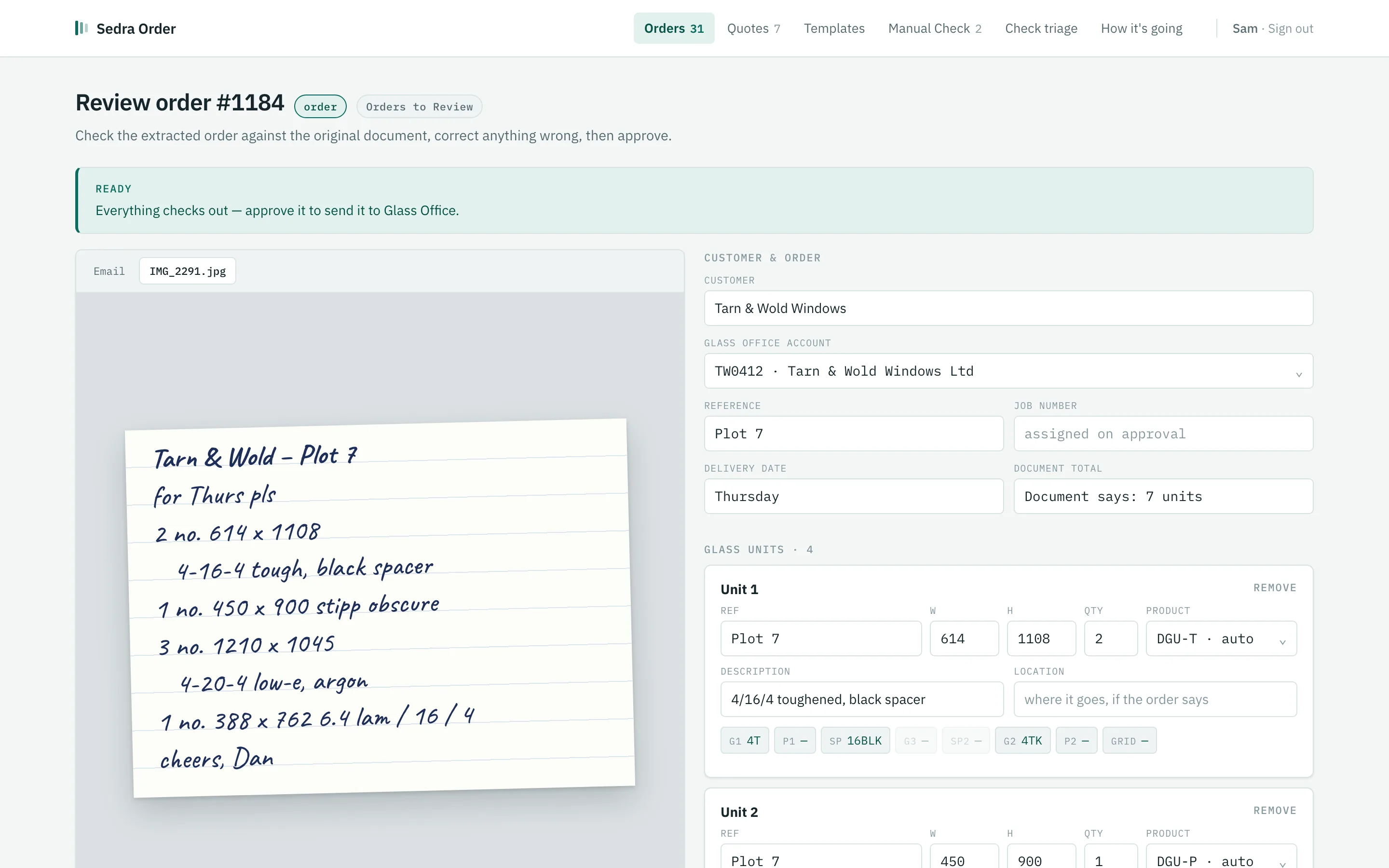
The Sedra Order review screen: a photographed handwritten order sheet on the left, the order read from it on the right, with Approve order at the bottom Illustration · invented order
How it works

From inbox to production

01 / 04
01

Order arrives

Your shared order mailbox is checked every ten minutes.

Your shared mailboxExample
An order email with a photographed order sheet attached
  • Order for Thursday – Plot 7Dan · Tarn & Wold Windows · 09:14
  • Invoice 20418 – spacer baraccounts · supplier · 08:52
  • Can you price 12 units for us?Northfold Joinery · 08:31
  • RE: Plot 4 – unit 3 should be 620 wideTarn & Wold Windows · 08:05
  • Christmas opening hoursnewsletter · yesterday
FromDan · Tarn & Wold Windows
SubjectOrder for Thursday – Plot 7

Morning, order attached for Plot 7. Need them Thursday if you can.

Cheers, Dan

IMG_2291.jpgPhone photo of a handwritten sheet
02

Sedra reads it

It sorts orders from other mail and reads every unit, in about eight seconds.

Sedra Order · readingExample
Sedra Order picking the glass units out of the order sheet
FromDan · Tarn & Wold Windows
AttachedIMG_2291.jpg

Tarn & Wold – Plot 7

2 no. 614 x 1108

  4-16-4 tough, black spacer

1 no. 450 x 900 stipp obscure

3 no. 1210 x 1045

  4-20-4 low-e, argon

1 no. 388 x 762 lam,

  same as last time

This isOrder
CustomerTarn & Wold Windows · account TW0412
ReferencePlot 7 · wanted Thursday
#WHQtyGlass
1614110824/16/4 toughened, black spacer
245090014/16/4 Stipp obscure
31210104534/20/4 low-e, argon
43887621Left blank — not guessed
Checked · 1 thing needs a person Unit 4 only says “lam, same as last time”. That goes to your staff.
03 · A person

Staff verify it

Your staff check it beside the original and approve. This is never automatic.

Sedra Order · reviewExample — try it
The Sedra Order review screen: the original document beside the order read from it
FromDan · Tarn & Wold Windows
AttachedIMG_2291.jpg

Tarn & Wold – Plot 7

2 no. 614 x 1108

  4-16-4 tough, black spacer

1 no. 450 x 900 stipp obscure

3 no. 1210 x 1045

  4-20-4 low-e, argon

1 no. 388 x 762 lam,

  same as last time

Review order

Needs a person Ready to approve Approved

Tarn & Wold Windows · account TW0412, matched from their last order · ref Plot 7

#WHQtyGlass
1614110824/16/4 toughened, black spacer
245090014/16/4 Stipp obscure
31210104534/20/4 low-e, argon
43887621
1 thing to sort before this can go Unit 4: the glass has been left blank rather than guessed. Pick it to carry on.
Ready Everything checks out. Approve it to write the import file.
Approved by you The import file has been written and the email is tagged in the mailbox.
Nothing is sent until someone approves it.
04

Ready for production

The import file is written into your production system's watch folder.

Your production system's watch folderExample
The approved order as an import file for the production system
Glass Office › Import › watch folder
ORDER_TW0412_Plot7.csv Ready to import
Account,Ref,Line,W,H,Qty,Glass
TW0412,Plot 7,1,614,1108,2,4/16/4 toughened black spacer
TW0412,Plot 7,2,450,900,1,4/16/4 Stipp obscure
TW0412,Plot 7,3,1210,1045,3,4/20/4 low-e argon
TW0412,Plot 7,4,388,762,1,4/16/6.4 laminated

A simplified example. The real file uses your production system's own layout and codes.

  • Nobody retyped itSeven units, from a photo of a handwritten sheet.
  • Your production system takes it from hereIt imports the file the way it already does.
  • The email is tagged in the mailboxAnyone looking at the mailbox can see it has been dealt with.
  • Who approved it is on recordWith every correction they made.
What's in it

The office's morning, screen by screen.

Sedra Order is one program with a handful of screens your staff work through. Each is shown here with an invented order.

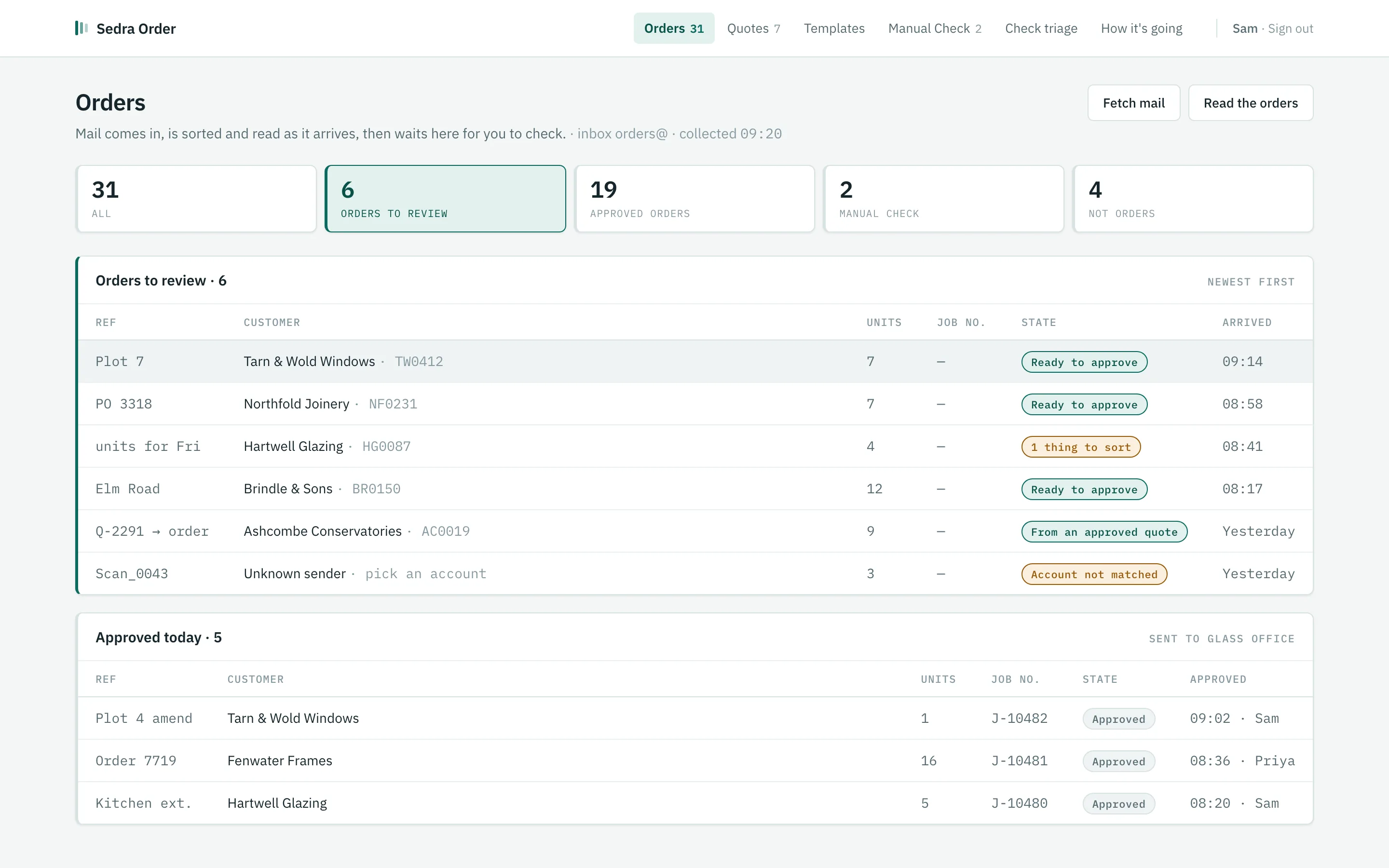
The Orders screen: counts for orders to review, approved, manual check and not orders, above a list of orders with their stateOrders
Sort

The inbox, sorted into piles.

Every ten minutes the shared mailbox is checked. Each email is sorted into what it is, and the orders are read as they arrive. Your staff see counts, not a list of unread mail.

  • Orders to review: read and checked, waiting for a person
  • Quotes: price requests, in their own queue
  • Manual check: anything the sorting wasn't sure about
  • Not orders: supplier mail and admin, kept but out of the way
The review screen with the original document beside the extracted orderReview
Review and approve

The original on the left. What was read on the right.

Staff compare line by line: sizes, quantities, make-up, the account, the delivery date. Codes the system worked out are shown as chips; one it couldn't resolve is left blank in amber for a person to pick.

  • Your own codes: product, glass, spacer and pattern codes from your production system
  • Learns customers: pick the account once, and the next order matches
  • Approve writes the import file. Nothing else does
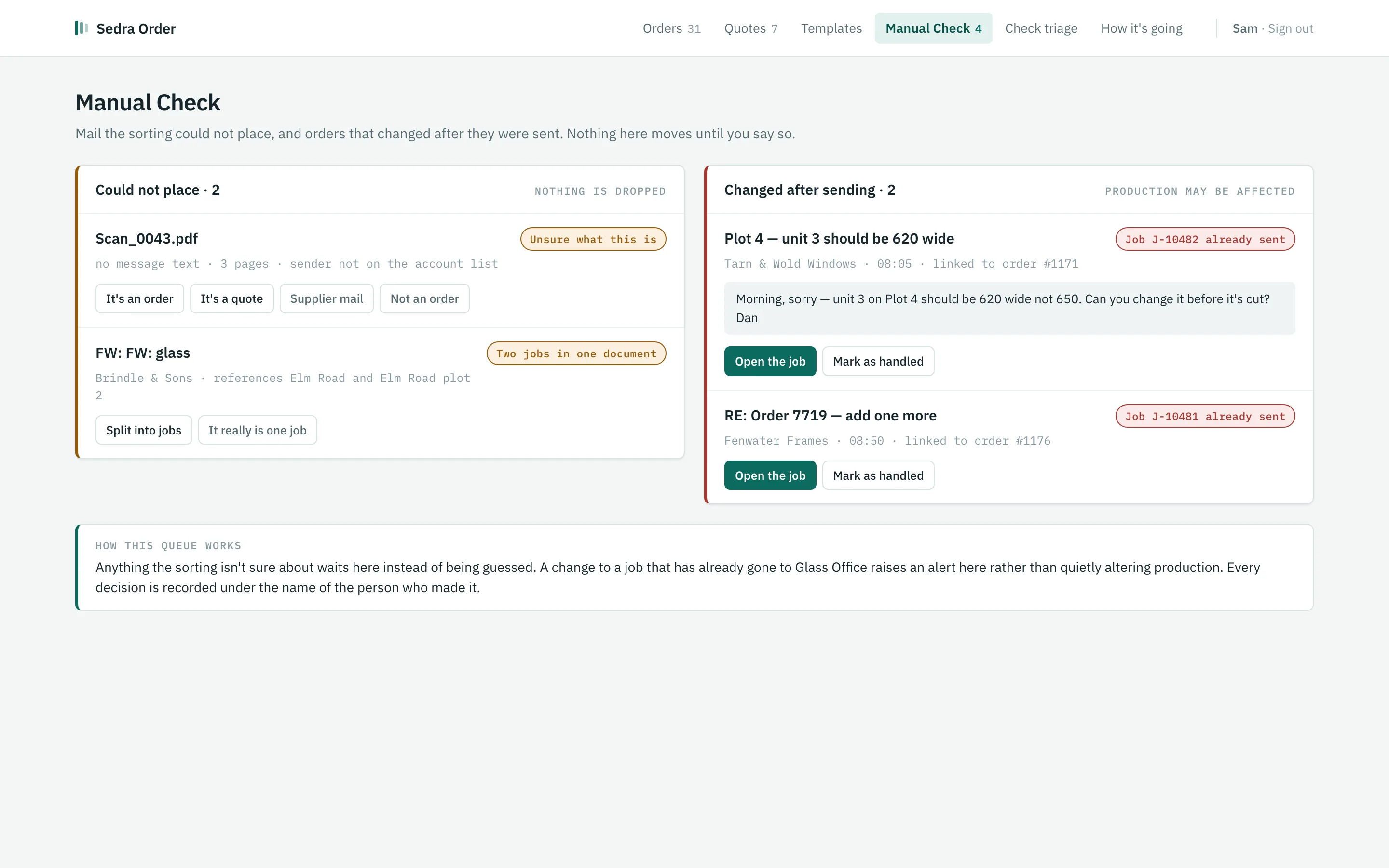
The Manual Check screen: mail the sorting could not place, and orders changed after they were sentManual check
Nothing lost, nothing slipped

Unsure goes to a person. Changed goes to an alert.

An attachment with no message, a document holding two jobs, a sender nobody recognises: these wait for a person rather than being guessed. A change to a job that has already gone to production raises an alert instead of quietly altering it.

  • No email is deleted or decided silently
  • Amendments are linked to the job they change
  • Every decision is recorded under the name of the person who made it
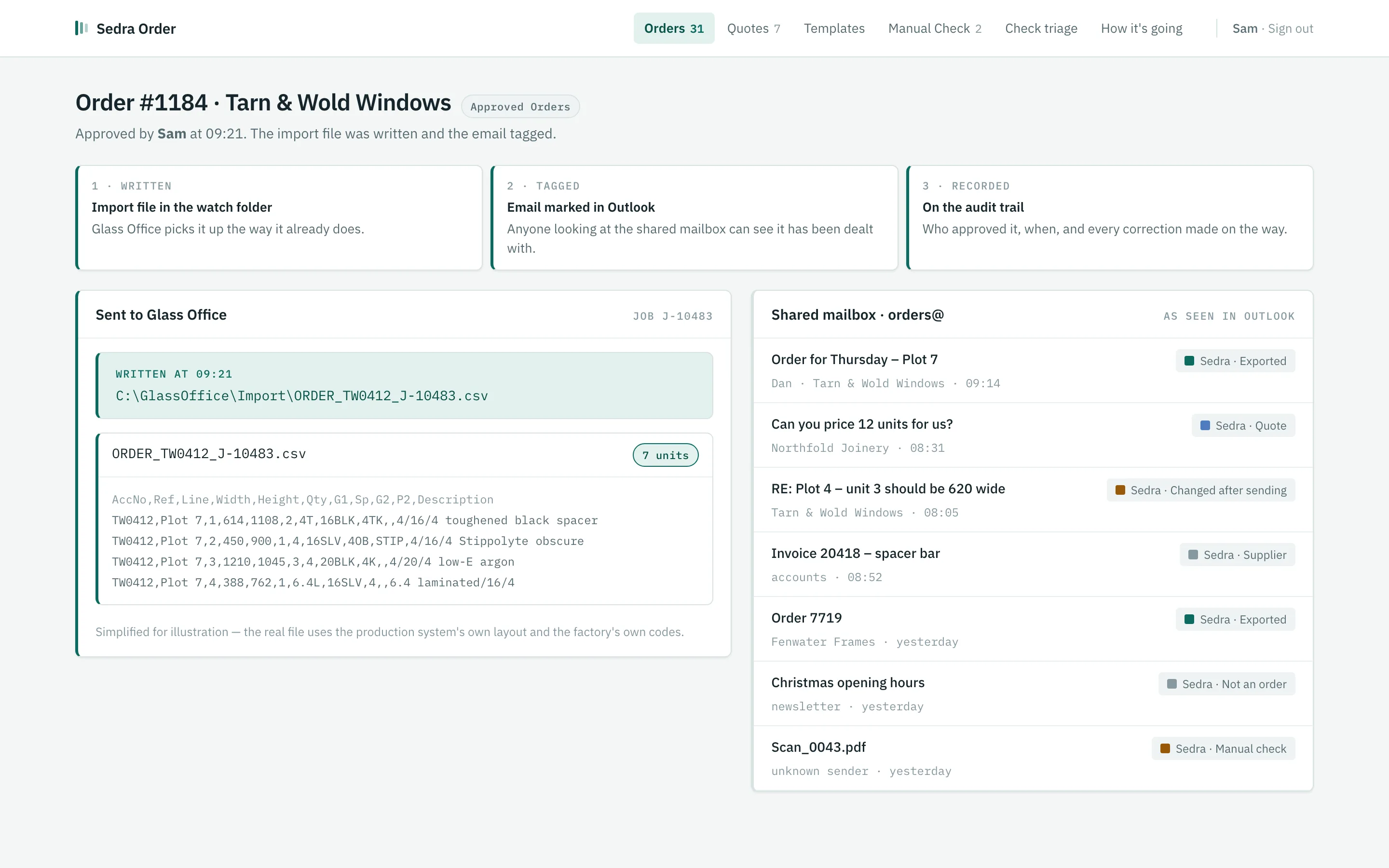
An approved order: the import file written to the Glass Office watch folder, and the email tagged in OutlookExport
Export

A file in the watch folder. A tag on the email.

Approval writes a ready-to-import file, in your production system's own layout, into the folder it already watches, and tags the email with what happened to it. Your system imports the file the way it already does.

  • Set up for your production system. Glass Office is the first it was built for; the export is a file in your system's own layout, so ask about yours
  • Tags on the email show the whole office what's been dealt with
  • Audit trail of who approved what, and every correction made on the way
Built to be relied on

Set up for your factory, and looked after.

Set up for your products, your customer accounts and your codes. It keeps a record of everything it does and tells your staff when something needs them. Reading an order takes roughly eight seconds.

In live use at a UK glass manufacturer

Looks after itself

Monitors its own health and alerts your staff by email or Teams.

Backed up daily

A bad day isn't a lost week of orders.

Who did what

An audit trail of every approval and every change, by name.

Measured, not guessed

Every correction is recorded, with time and cost per order.

Is it for us?

Plain about where it stops.

Sedra Order is for glass processors and sealed-unit manufacturers who take trade orders by email and key them into a production system.

  • Built around Microsoft 365 and Glass Office first. Each factory is set up for its own mailbox and production system, so if yours are different, ask: it's a setting-up job, not a no.
  • It doesn't reply to your customers or send confirmations. That stays with your office.
  • It writes the import file and your production system takes it from there.
  • It isn't something you sign up to and set up alone. Each factory is set up with us, tuned to its products.
  • It doesn't replace your office staff. It takes the retyping off them and leaves the decisions with them.

Orders from your website land here too.

Sedra Configurator lets customers build and order units on your own site. Those orders arrive in Sedra Order for the same review.

About Sedra Configurator

See it read one of your own orders.

Tell us how orders reach you today and we'll arrange a demo using orders like yours.

Ask for a demo